How-To Guides
How to Create a Video Pipeline
- From the Dashboard, click + New Pipeline.
- Enter a Pipeline Name and a valid SLURM Account.
- Under What will you annotate?, choose Video — segment and track through a video.
- Optionally add a Description.
- Click Create & Open.
How to Upload a Video Already on HPC
- In Step 1, choose HPC storage.
- Select the System the video is on.
- Enter the full Video file path, or click the browse icon to pick it.
- Start the upload. The video is downloaded from Tapis, then sent to the GPU service.
How to Fix a Mask That Drifted
- In the results view, scrub to the first frame where the mask is wrong.
- Select the object in the Objects panel and redraw its mask on that frame.
- Click Track again.
How to Start Over
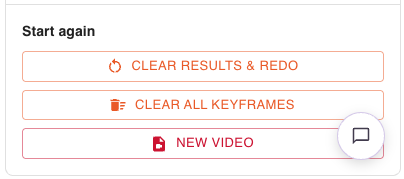
The Start again section offers three actions, each behind a confirmation:
- Clear results & redo — discard the tracking results and keep your keyframes.
- Clear all keyframes — remove every keyframe mask and rebuild from scratch.
- New video — leave this video and upload a different one.
How to Resume a Video Pipeline
From the Dashboard, open the Videos tab and click Open Pipeline on the pipeline card. Your objects and keyframe masks are restored.
Note: Resume state is stored in your browser. Opening the pipeline on another device or browser starts it fresh.
How to Connect to the SAM3 Video Service
Set these in client/.env (see client/.env.example):
| Variable | Purpose |
|---|---|
SAM3_VIDEO_URL | Address of the auth gateway, or of the service itself (e.g. http://127.0.0.1:2129 through an SSH tunnel). |
SAM3_VIDEO_AUTH | gateway when SAM3_VIDEO_URL points at the auth gateway; none (or unset) for a direct connection. |
SAM3_ENDPOINT | Per-image SAM3 service used for SAM3 clicks on keyframes. |
TAPIS_BASE_URL | Tapis tenant, used for HPC uploads and exports. |
ANNOTATOR_TYPE | VIDEO_SEGMENTATION for a video-only instance, SEGMENTATION for images and video together, or empty for all types. |
Direct connection over SSH. If the service runs on an HPC GPU node, open a tunnel and keep it open while you work:
ssh -L 2129:localhost:2129 user@gpu-host
Leave SAM3_VIDEO_AUTH unset for a direct connection. Setting it to gateway against the bare service makes every request fail CORS.
Through the auth gateway. Point SAM3_VIDEO_URL at the gateway and set SAM3_VIDEO_AUTH=gateway. The page's origin must be in the gateway's allowed origins. Dataset export to HPC is available only in this mode.