How-To Guides
Get a Tapis access token
- Visit icicleai.tapis.io and sign in (TACC account, fresh signup, or CILogon).
- Click your username in the bottom-left corner.
- Choose Copy Access Token and paste the JWT into the notebook.
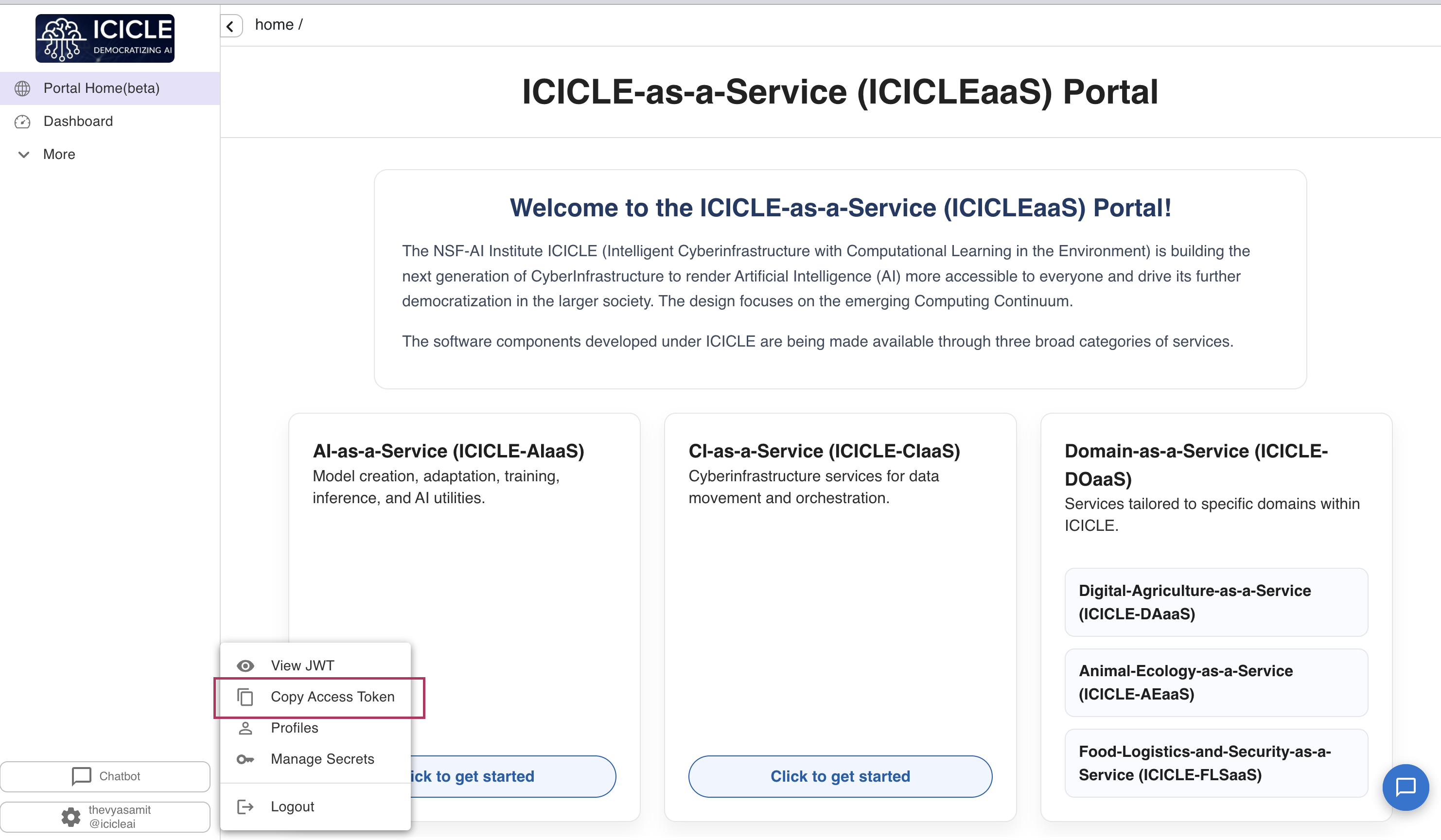
⏰ Tokens expire after ~4 hours. If you start seeing
401 Token expired, refresh the token from the Tapis UI and paste it again.
Tune ingestion behaviour
Open the ⚙️ Ingestion settings accordion in the notebook:
- Topic — a label stored with every chunk you ingest (e.g.
paper-2024). One collection can hold several topics; the chat can later search one of them or all. The collection itself is named next to the Ingest button. - Chat model — the list is fetched live from LiteLLM's
/v1/modelswhen you validate your token, so it always matches what TACC actually hosts (audio models likewhisper-large-v3are filtered out). - Top-K retrieval — how many chunks to pull back per question. Raise it for broader context; lower it to keep prompts tight.
- Rerank — how the retrieved chunks are reordered; see Choose a rerank method.
- Max chunk tokens / Chunk overlap tokens — chunking budget. Larger chunks preserve more context per vector; overlap reduces "split at a bad spot" misses.
Manage collections and choose what to chat with
🗂️ Your collections (below the ingest box) lists every collection you own — three per page, with page numbers to click — showing its embedding count, topics and vector dimension. The table's own toolbar lets you search and filter it.
- 💬 Use in chat — select one row to point the chat at it. A Chatting with … line appears above the chat with a Topic picker: All topics, or one topic to narrow retrieval to a single document.
- Ingesting also points the chat at the collection you just filled, filtered to the topic you ingested under.
- 🗑️ Delete selected — select one or more rows. Permanently removes your embeddings in them.
- Until a collection is picked or ingested, the chat asks you to do one or the other.
Collections are private to your token: the vector service keeps each user's collections
separately, so two people can both have icicle-demo-collection without seeing each other's data.
Names are normalised by the service — icicle-demo-collection is listed as icicle_demo_collection
and both refer to the same collection.
Choose a rerank method
Plain vector search returns the top-K chunks by cosine similarity. Reranking asks the vector service
for a wider shortlist (max(20, 5 × top-K) candidates) and reorders it before the top K reach the
model. Pick one in ⚙️ Ingestion settings → Rerank:
| Method | What it does | Pick it when | Cost |
|---|---|---|---|
| MMR (default) | Balances relevance against diversity, so near-duplicate chunks don't crowd the context | General use; documents that repeat themselves or overlapping chunks | Fast |
| Cross-encoder | A model reads the question and each chunk together and scores true relevance | Precise questions where the best chunk must win; the most accurate option | Slowest; the first call loads the model |
| Cosine rescore | Recomputes exact cosine over the shortlist and re-sorts | You want plain similarity ranking, minus the small errors of approximate search | Fast |
| Off | Top-K straight from vector search | Baseline comparisons, or the fastest answers | Fastest |
With reranking on, each chunk under an answer shows both its rerank score (what the order is based on) and its original cosine score, and the footer names the method used. The method is also logged to MLflow, so you can compare methods on the Found the right passages score. If the cross-encoder isn't installed on the service, the answer says so — pick another method.
Take notes while you read (Study mode)
A question occurs to you halfway through a long answer, and asking it scrolls away what you were reading. 📚 Study mode (the switch beside 💬 Chat) puts a notes panel next to the conversation.
- Type a thought, click ➕ Add, and tag it ❓ Ask later or 📝 Just a note. Notes are never sent anywhere; ✖ drops an item.
- Click 📤 Ask N questions. With two or more queued you can tick Answer them together in one reply — one prompt, one retrieval, faster but less precise.
- A confirmation panel lists what will go out before anything is sent.
- ⬇️ Export session (.md) downloads every question, answer and kept note. Chats aren't saved in this release — closing the tab or letting the session expire loses them — so export anything you want to keep.
Both ways of asking feed one conversation, newest answer expanded at the top. The switch only shows or hides the panel, so nothing is lost.
By default the conversation remembers itself: the last few turns are folded into the prompt, so a follow-up like "explain the second one" resolves against what was just said. Retrieval still embeds your question on its own, so chunk selection stays predictable. Turn the behaviour off with the Remember conversation switch.
Score answers with an LLM judge (G-Eval) and log to MLflow
Every answer can be graded in the background by a second model, with the scores logged to MLflow so you can see whether a settings change actually helped.
What gets scored
Four dimensions, each 1–5, each judged by its own prompt:
| Dimension | Question it answers |
|---|---|
| Faithfulness | Is every claim in the answer supported by the retrieved chunks? (the hallucination check) |
| Answer relevance | Does the answer address what was actually asked? |
| Context relevance | Were the retrieved chunks any good? — this scores the retriever, so it's the number to watch when tuning Top-K and chunk size |
| Coherence | Is the answer well organised and readable? |
Alongside those, each turn logs metrics that cost nothing extra: mean/max/min retrieval score, per-stage latency (embed, retrieve, chat, judge), chunk count, and answer length.
The judge defaults to a different model family than the one that answered — a model asked to
grade its own output scores it generously. Override with ICICLE_JUDGE_MODEL.
Turning it on
Evaluation runs by default and shows scores inline. MLflow logging is separate: the hosted chatbook already logs to the ICICLE MLflow pod, so there's nothing to set up. Running locally, it stays off until you point it at an MLflow of your own:
export MLFLOW_ENABLED=true
export MLFLOW_TRACKING_URI="https://<your-mlflow>"
uv run marimo run notebooks/rag_chat_marimo.py
| Variable | Default | Purpose |
|---|---|---|
MLFLOW_ENABLED | false | Master switch for metric logging |
MLFLOW_TRACKING_URI | (empty) | MLflow server. Empty → logging disabled |
MLFLOW_EXPERIMENT | icicle-chatbook | Experiment to log into |
MLFLOW_TIMEOUT_SECONDS | 2.0 | Per-call timeout |
MLFLOW_LOG_CONTENT | 1 | Log questions/answers/rationales; 0 = metrics only |
MLFLOW_TRACING_ENABLED | follows MLFLOW_ENABLED | GenAI trace emission (the Traces tab) |
ICICLE_JUDGE_MODEL | gpt-oss-120b | Default judge model |
ICICLE_EVAL_ENABLED | 1 | Judge kill switch |
ICICLE_TOKEN_SOURCE | auto | Where the Tapis token comes from — auto, cookie, manual |
These are read at startup, so set them before launching. On a pod they go in the pod's environment config; nothing MLflow-related is baked into the image. In the app you can still switch judge model or turn judging off for the session.
One MLflow run per session, one step per turn, so each dimension plots as a curve. Give it its own
experiment name — icicle-ai-embed-service logs one run per request, and mixing both shapes in one
experiment makes the run table unreadable.
⚠️ Cost: 4 extra model calls per answer. Privacy: questions, answers, chunks and judge reasoning are logged;
MLFLOW_LOG_CONTENT=0keeps metrics only.
Trace each turn into MLflow's GenAI tab
Metrics fill MLflow's experiment table; the Traces tab shows one RAG turn as a tree. Set
MLFLOW_TRACING_ENABLED=true (it follows MLFLOW_ENABLED). Needs MLflow 3.x with a SQL-backed
store — a file store can't ingest traces.
| Span | Type | Carries |
|---|---|---|
rag_turn | CHAIN | question, answer, topic/top-K/rerank method, per-stage latency |
embed_query | EMBEDDING | vector dimension |
retrieve | RETRIEVER | retrieved (and reranked) chunks as Documents, with scores and provenance |
generate | LLM | model id, chunk count, answer |
The RETRIEVER type matters: MLflow's built-in RAG judges only see retrieval when a span is typed
that way with Document outputs. MLFLOW_LOG_CONTENT=0 applies here too — spans keep their shape
and drop the text.
Which models are actually up
GET /v1/models lists what the proxy is configured with, not what answers. So once your token
validates, the notebook pings every model in the background and marks both dropdowns: ✅ answered,
❌ didn't (sorted last). One line underneath gives the tally and a 🔄 Re-check button. A model
that fails its ping is never left selected.
Reading the results
Scores appear under each answer as a plain-language 🧪 Answer check, out of 5 and colour-coded (🟢 4–5 · 🟡 3–3.9 · 🔴 below 3). They land a few seconds after the answer — the judge runs in a background thread.
| Shown as | G-Eval dimension | What it checks |
|---|---|---|
| Sticks to the document | Faithfulness | Every claim is backed by the retrieved passages |
| Answers the question | Answer relevance | It addresses what was asked |
| Found the right passages | Context relevance | Retrieval quality, judged without seeing the answer |
| Clearly written | Coherence | Structure and readability |
What do these scores mean? expands each check with the judge's own reasoning.
Sign-in: pasted token or Tapis session
On a Tapis pod the browser already holds an X-Tapis-Token cookie, and marimo passes the request to
the kernel — so the notebook reads the token from there, validates on load, and tucks the paste box
and the token walkthrough into a collapsed Session expired? Paste a token instead fallback. Locally
there's no cookie, so you paste one as usual.
ICICLE_TOKEN_SOURCE | Behaviour |
|---|---|
auto (default) | Cookie if there is one, otherwise paste — right in both places |
cookie | Same, but says so when the cookie is missing |
manual | Ignore the cookie; test the paste flow on a pod |
Tokens expire after ~4 hours, and the pod's cookie is not refreshed by being signed in at the Tapis portal — that's a separate login. When the cookie's token has expired, the notebook shows the paste box up front; paste a fresh token (or clear the site's cookies and reload to sign in again). 🔄 Re-check Tapis session re-reads the cookie the browser holds at click time.
Preload a token via environment variable
Locally, skip the paste step by exporting TAPIS_TOKEN before launching marimo — the token input
prefills from os.environ["TAPIS_TOKEN"].
export TAPIS_TOKEN="eyJ..."
uv run marimo run notebooks/rag_chat_marimo.py
Reset the local environment
If dependencies get out of sync or you want a clean rebuild:
rm -rf .venv uv.lock
uv sync